
Problems and solutions: Why build this n8n integration flow?
While working with Pangea Trust, an Elephant Sanctuary in Portugal, I set them up with Beacon CRM. They did not have a CRM before that, so the first step was importing their data from spreadsheets to Beacon.
The setup worked well, but we faced a few issues…
Problem 1: Beacon's one currency per form and no UTM tracking (Built WP Plugin #1)
The first problem: Beacon requires one currency per form, and does not pass UTM tracking data automatically.
The solution: I created a new WordPress plugin that integrates multi-currency Beacon forms into WordPress and passes UTM tracking data to the Payment and Subscription tables in Beacon.

This solution worked well, and they started raising funds while retaining the "donor covers fees" upsell, and without any vendor lock-in, as Beacon sets up the recurring payment subscriptions within the organisation's Stripe and PayPal account.
Check out the calculator I created comparing the hidden-fees of fundraising platforms and how these platforms take huge cuts from your donations while advertising that their services are "free". Not at all!
Problem 2: They needed a crowdfunding page, but Beacon does not offer that
The second issue was that Beacon only offers forms, but no crowdfunding interface with goal progress bar, recent and top donors to encourage more donations.
A crowdfunding "progress bar" has been shown to have higher conversions and increase donation amounts by up to 51%. So, it was important to figure out crowdfunding for Pangea.
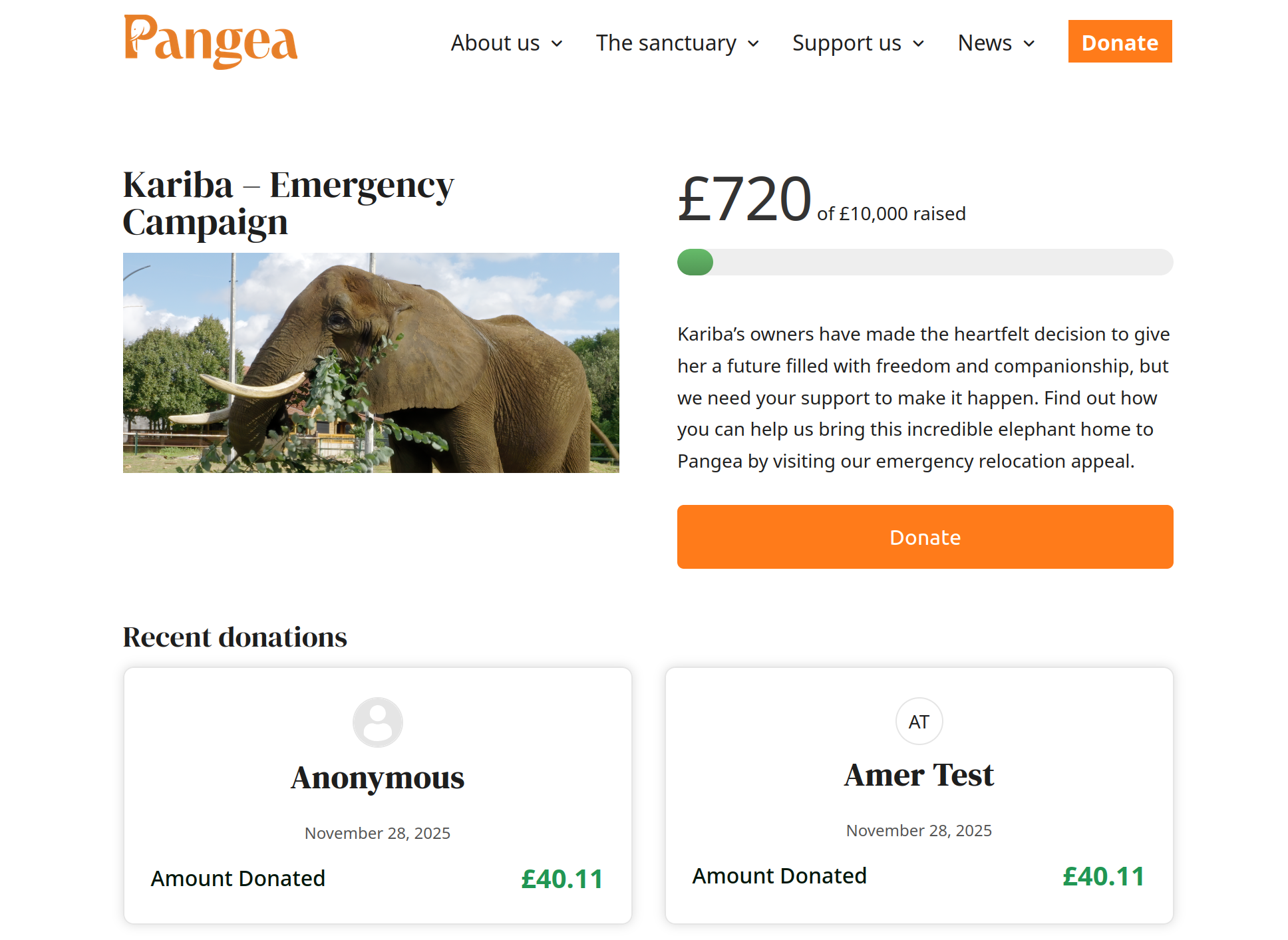
They started by asking me to integrate JustGiving, but after some digging, I could not let them do that with good conscience. From my research, JustGiving takes a huge cut from your donations by keeping about 20% collected under the pretense of "donor covers fees" and they do not even cover your org's Stripe/PayPal transaction fees. JustGiving also does not have embedded forms or campaigns, which means you need to send your donors to their website rather than keep them on your charity's website. They made £59m of income off of charities in 2023!
The solution: The best method that does not take percentage cuts I found is GiveWP Donations WordPress plugin (paid, no percentage, cheap flat-rate), which solves all these issues for us. This way Pangea owns their forms and donation flows.
Problem 3: GiveWP's API is too basic (So I Built WordPress Plugin #2)
As of version 4.13.1 of GiveWP, their built-in API does not return the full meta data of the donor, donation and subscriptions. This meant that I could not access the data I needed to build this integration.
The solution: To fix this issue, I built a new WordPress plugin called GiveWP Enhanced API that adds 5 GiveWP enhanced endpoints with full custom field and Gift Aid data. It uses the same API authentication method as the built-in API that you can find from GiveWP -> Tools -> API on your WordPress installation.
You can download and install the plugin from the releases page on the Github repo.
The GiveWP → Beacon CRM Integration – n8n Workflow (High-level Overview)
Now that we have GiveWP installed and set up, we need it to talk to Beacon CRM so that all donation data is synced to Beacon immediately.
This is what the rest of the article is about: the n8n workflow.
Compulsory Zapier side-rant: They are unreasonably priced!
For 500 donations per month × ~20 tasks per flow = 10,000 tasks per month, Zapier's Team plan costs £198.01/mo!
That's why I always recommend n8n. It's open source with a huge community and a reasonable pricing model. The same 500 donations would cost €20/m.
This automation keeps GiveWP, Beacon CRM, Stripe and PayPal in sync.
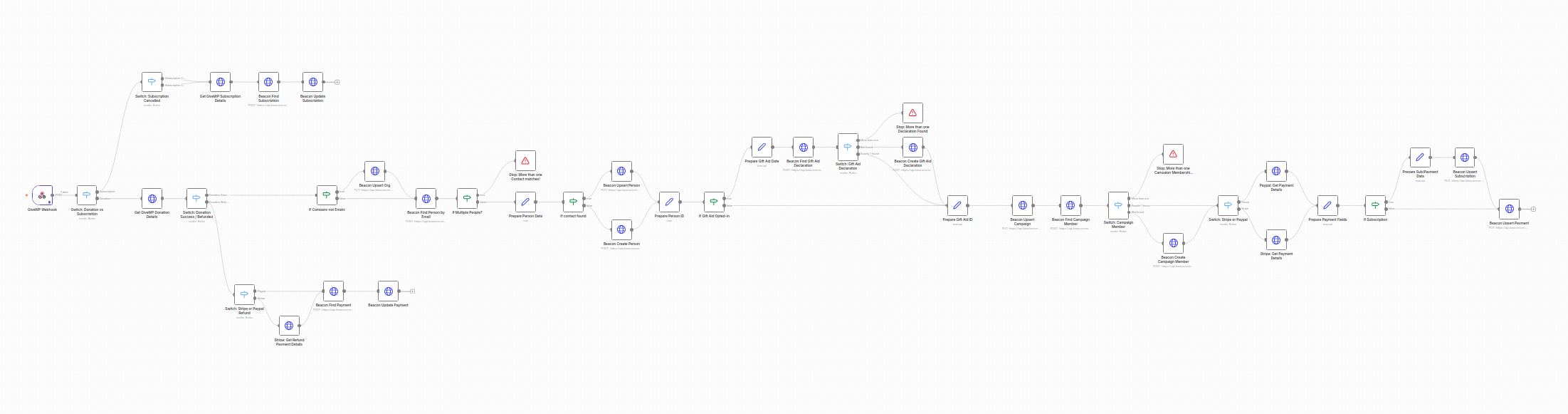
Whenever something happens in GiveWP:
- A donation is made or updated
- A subscription is created, completed, or cancelled
- A donation is refunded
…the flow:
- Keeps the donor's contact up to date in Beacon
- Records or updates organisations (companies)
- Handles Gift Aid opt-ins and declarations
- Creates/updates campaigns and campaign membership
- Keeps subscriptions and payments in Beacon in line with GiveWP & Stripe/PayPal
- Records refunds where they happen
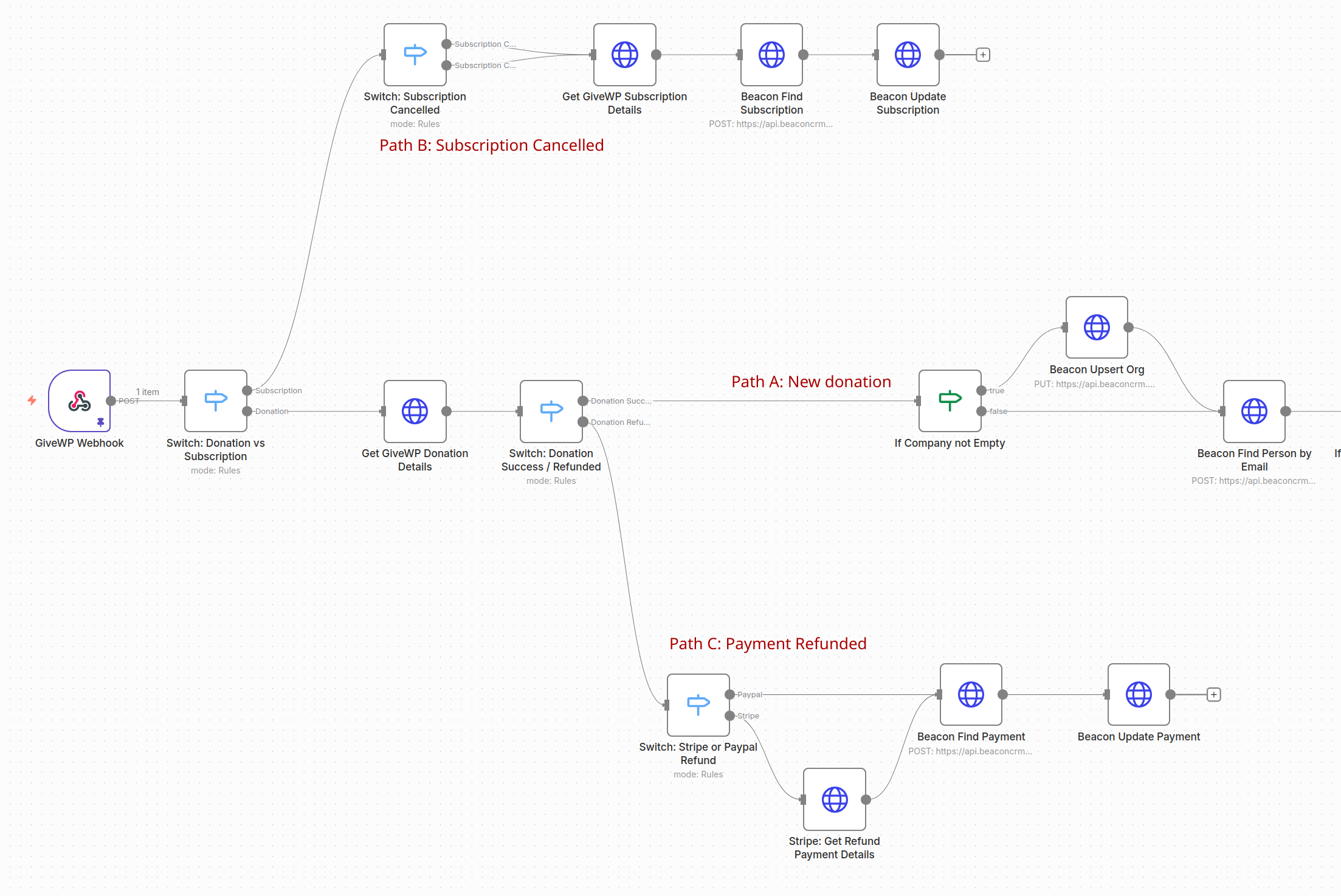
Path A: Handling when a donation succeeds
If GiveWP sends a successful donation:
1. Organisation (company)
- If the donor entered a company name, the flow:
- Creates or updates an Organisation in Beacon with that name.
- If no company is given, this step is skipped.

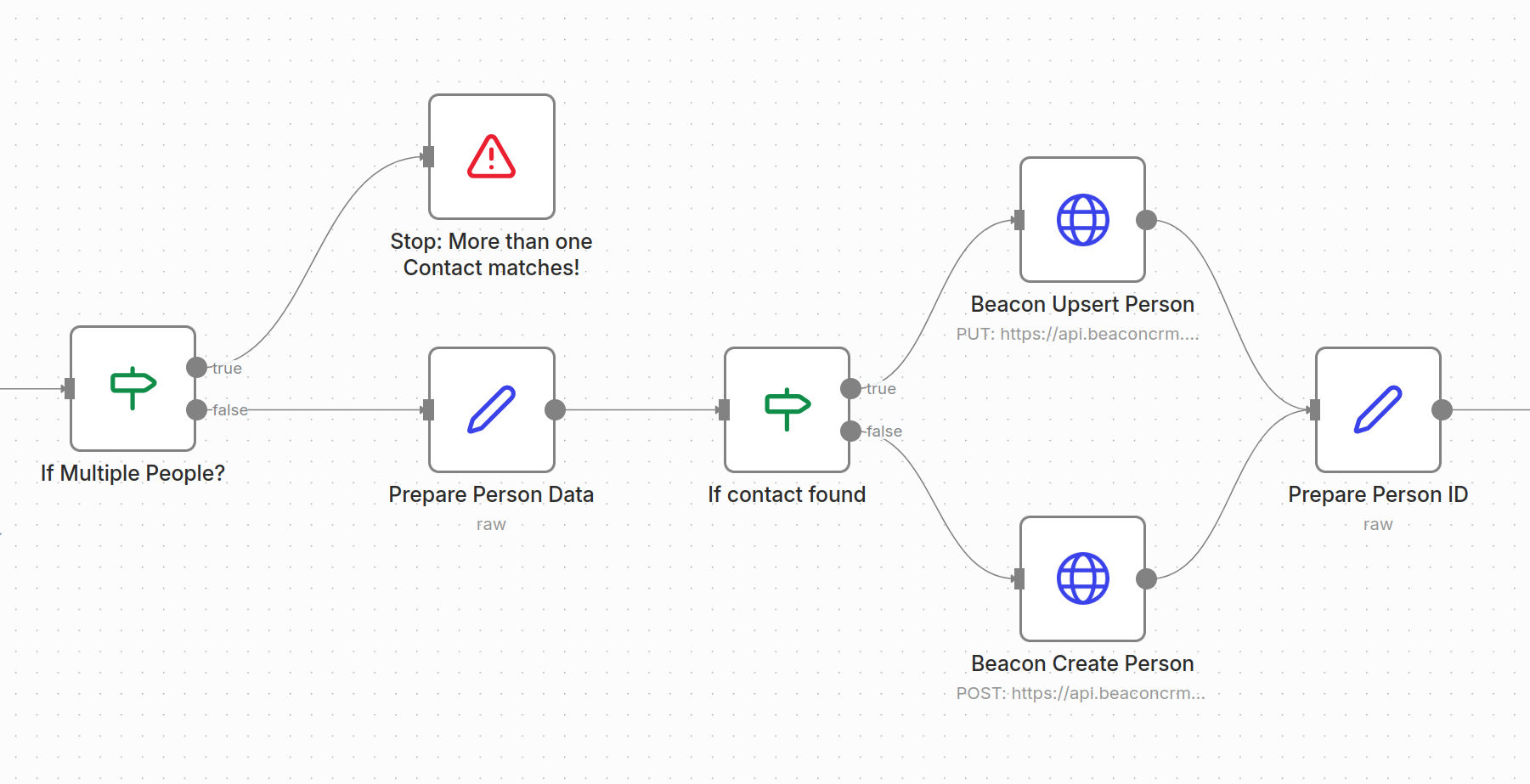
2. Contact (Person)
- The flow looks up the donor in Beacon by email(s).
- If:
- Exactly one person is found → that record is updated.
- None are found → a new person is created.
- More than one is found → the flow stops and shows an error so you can fix the duplication.
The contact record includes:
- Name, email(s), phone (if given)
- Address (Gift Aid address first, otherwise billing address)
- Type: Donor
- A full “GiveWP notes” field with donation details, subscription info, Gift Aid dates, etc.
3. Gift Aid Declarations
If the donor ticked Gift Aid, the flow:
- Extracts the Gift Aid date from GiveWP.
- Looks for an existing Gift Aid declaration in Beacon for that person + date.
- If:
- None found → creates a new declaration (linked to the person, with method “Website” and address in notes).
- One found → reuses it.
- More than one found → stops with an error so you can check.
The chosen declaration is then linked to the Beacon Payment record.

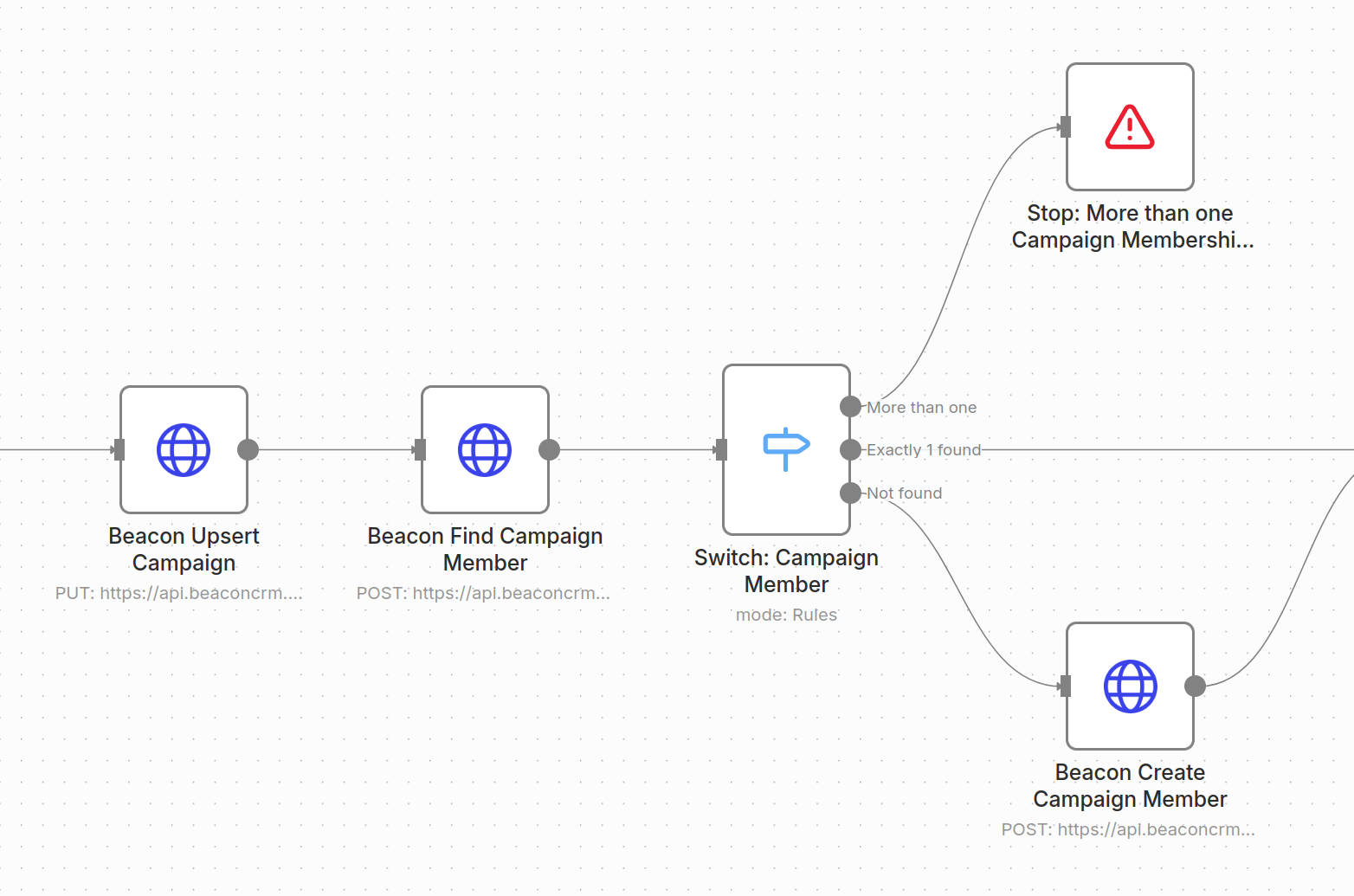
4. Campaigns and campaign membership
Using the campaign data from GiveWP, the flow:
- Upserts a Campaign in Beacon using the GiveWP campaign ID as external ID.
- Ensures there is a Campaign Member record linking:
- The Person
- The Campaign
- With status “Successful”
If it finds more than one membership record, it stops with an error so you can resolve the duplicate records.
5. Subscriptions (for recurring donations)
If the donation is part of a subscription:
- The flow calculates a friendly frequency (Monthly, Quarterly, Annually).
- It upserts a Subscription in Beacon with:
- External ID (gateway subscription ID)
- Status (Active/Cancelled etc.)
- Frequency
- Customer (Person)
- Campaign
- Amount & covered fees
- First/last/next payment dates
- Gift Aid allowed (true for GBP)
- UTM fields and notes
This subscription is then linked to the payment.

6. Payments (one-off and recurring)
This uses the same prepared data we used for the subscriptions. For every successful donation, the flow upserts a Payment in Beacon using an external ID from Stripe/PayPal.
The Payment record includes:
- Link to Person (customer)
- Link to Campaign
- Link to Subscription (if recurring)
- Amount, covered fee, gateway fees (from Stripe or PayPal)
- Payment method (e.g. Card, Apple Pay, Google Pay, PayPal)
- Gift Aid allowed + linked Gift Aid declaration
- UTM fields and rich notes
- Tribute fields (in memory / in honour of), plus recipient details if an e-card is requested
- Custom fields:
c_support_for_elephantfor this use-case.
Path B: Handling subscription cancellation or completed
If GiveWP sends a subscription event (not an individual donation):
- The flow looks up the subscription in GiveWP.
- It finds the matching Subscription in Beacon (by external ID).
- If it's been cancelled, Beacon's subscription is set to “Cancelled”.
This means Beacon will show the correct subscription status without manual updates.

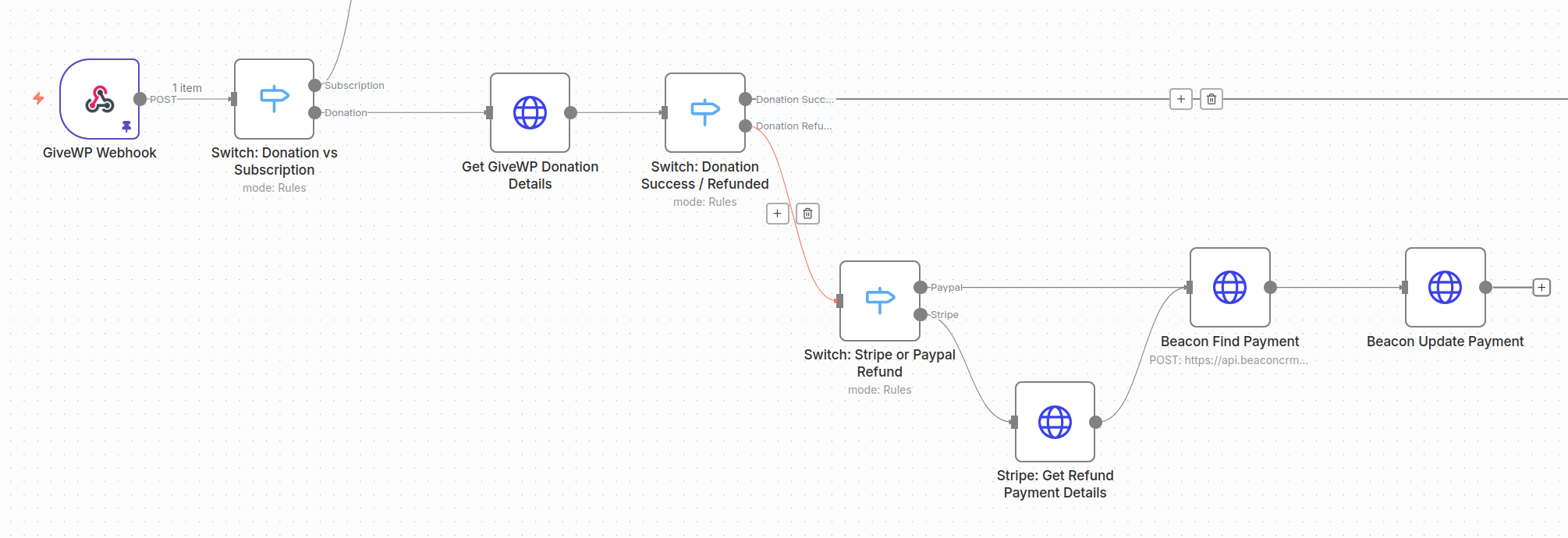
Path C: Handling Refunds
When GiveWP marks a donation as refunded:
- The flow detects whether it was Stripe or PayPal.
- It finds the corresponding Beacon Payment by external ID.
- It updates:
- The refunded amount and currency.
- For PayPal, adjusts the gateway fees (since PayPal refunds fees; Stripe doesn't).
Quick way to edit the logic using ChatGPT
Whenever you want to tweak the logic (e.g. field mappings, frequency rules, mapping payment methods):
- Copy the expression from the relevant n8n node (the text including the curly brackets
{{and}}). - Paste it into ChatGPT with a prompt like:
This is my current n8n expression:
{
  {
    /* original expression here */
  }
}
Your updates MUST edit the expression minimally, use meaningful variable names and be readable and maintainable Javascript code. Reply with the full updated expression so that it: describe your change here.
- Paste the updated expression back into n8n.
Download & Import this n8n Workflow
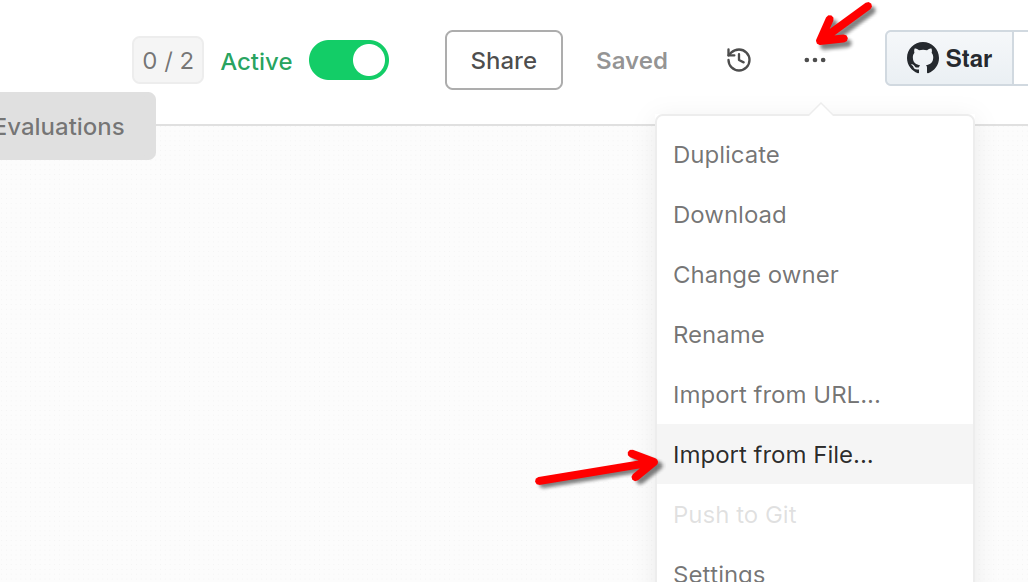
You can download the full n8n GiveWP - Beacon Sync workflow here. Click Raw then Save Page As and save it as a .json file.
You can import it to your n8n account from the dot-menu on the upper right hand side:
Wrapping up
A lot of work went into building this integration.
- You can download the WordPress plugin I created to allow you to get full meta data from GiveWP here, and
- You can download the JSON for the n8n workflow from the link above.
Hope this saves your charity time and money. Please share your story with me if you find this useful.